
Turn any document into clean, structured data
Pull data from receipts, invoices, bank statements, and any PDF or image — then export to Excel, CSV, or JSON. Do it in seconds, right in the app. No more manual data entry.
5 free credits (pages) • No credit card required • Cancel anytime
Two ways to use DocInterpreter
Use one. Or both.
One platform, two ways to get structured data out of your documents — pick the one that fits how you work.
AI Data Extraction
Upload & go
Drop in a PDF or image and AI reads it on its own — returning clean, structured data. No templates, no setup. Define a custom schema when you want exact fields.
- How
- Upload in the app, AI auto-detects fields
- Best for
- Fast, ad-hoc extraction to JSON/CSV/Excel
Auto Extract
AI detects the fields and pulls the data for you — zero setup or templates.
Custom Schema
Define exactly which fields to capture and get back only those.
Structured JSON
Clean, predictable output ready to drop into any system.
Export anywhere
Download as JSON, CSV, or Excel in one click.
Upload a document, get structured data back
The fastest way to handle a one-off document. Drop in a receipt, invoice, or any PDF and the AI reads it automatically — no drawing, no clicking, no templates. Need specific fields? Define a custom JSON schema and it extracts exactly those. Export the result to JSON, CSV, or Excel and you're done.
See it in action
Watch how DocInterpreter turns a messy PDFs and images into a structured Excel, CSV or JSON file in under 60 seconds — no setup, no technical knowledge required.
When you want total control over the table
Generic OCR guesses at your layout and gets it wrong. With the OCR tool you map the table yourself — draw the boundaries, place the rows and columns, and get back exactly the cells you specified. Perfect for dense bank statements and unusual layouts.
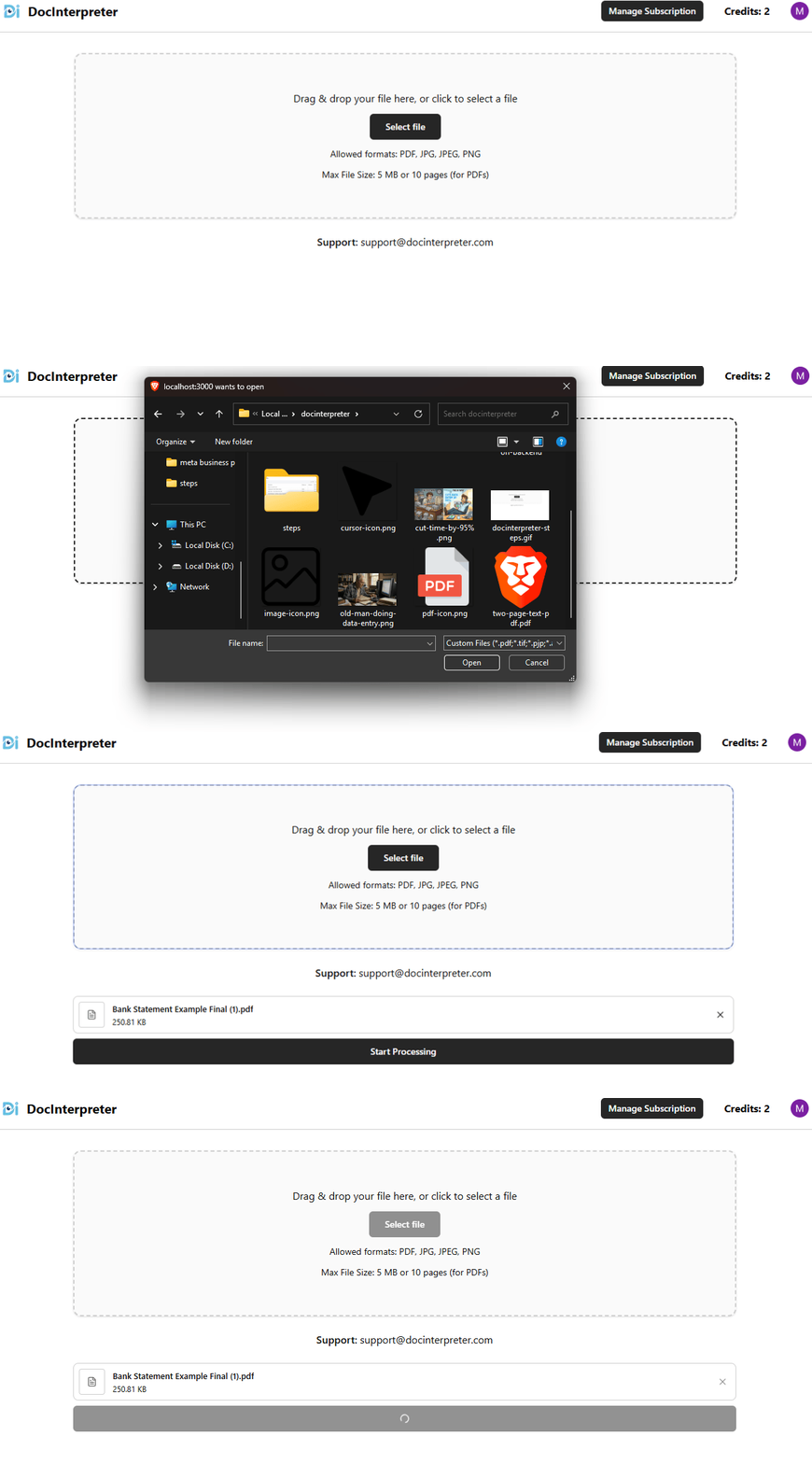
Drop it in. Any format, any layout.
PDFs, JPEGs, PNGs — a crisp digital export or a photo snapped on your phone. Drag and drop, and it's ready for extraction in seconds.
- PDF · JPG · PNG
- Up to 10 pages
- Up to 5 MB
- No reformatting needed
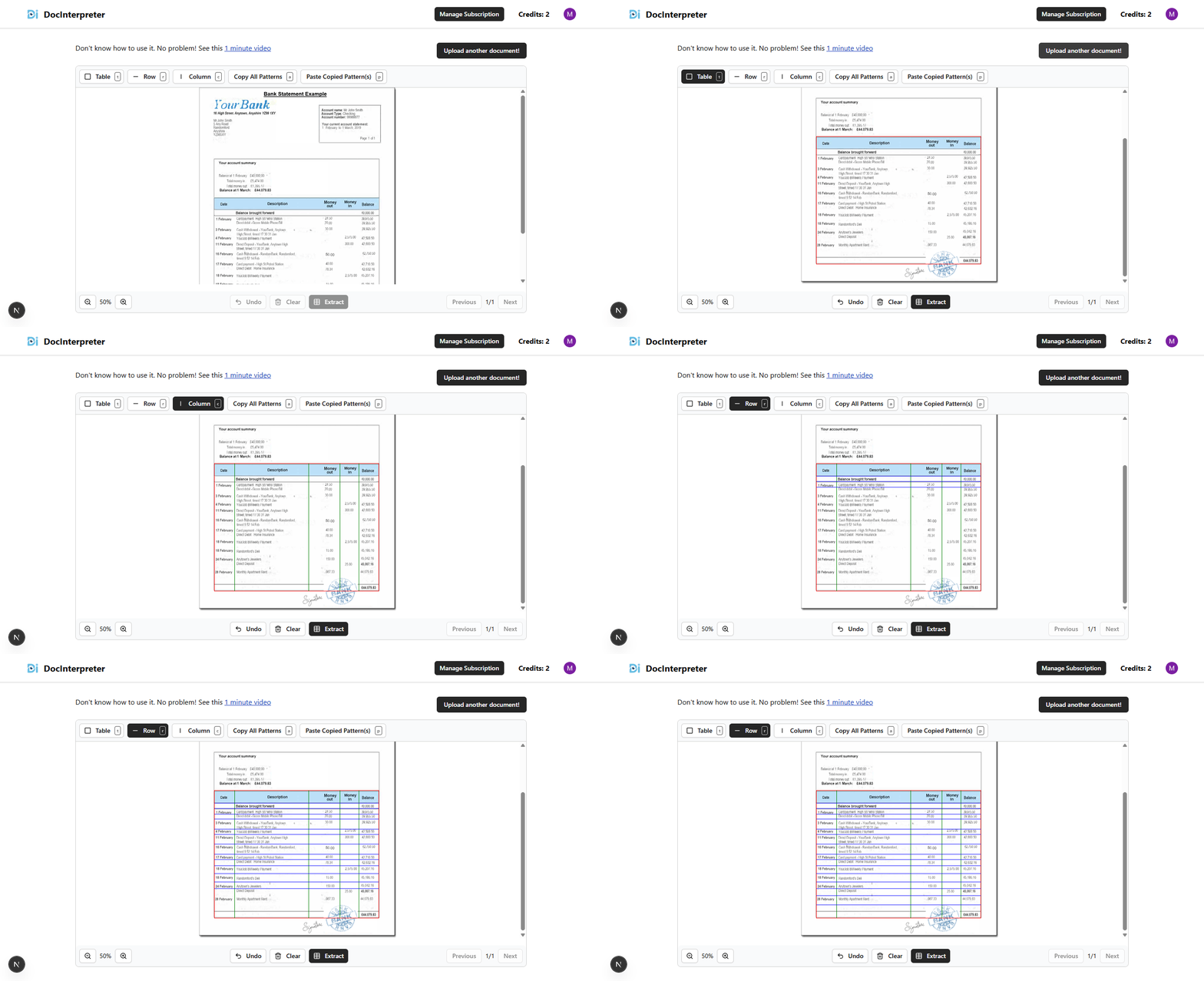
You define the structure. AI handles the rest.
Draw a box around your table, add row and column dividers with a click, and the AI extracts exactly the cells you specified. Got a 10-page statement with the same layout? Copy the pattern once and paste it across every page instantly.
- Draw table boundaries
- Add rows & columns
- Copy pattern across pages
- Full zoom control
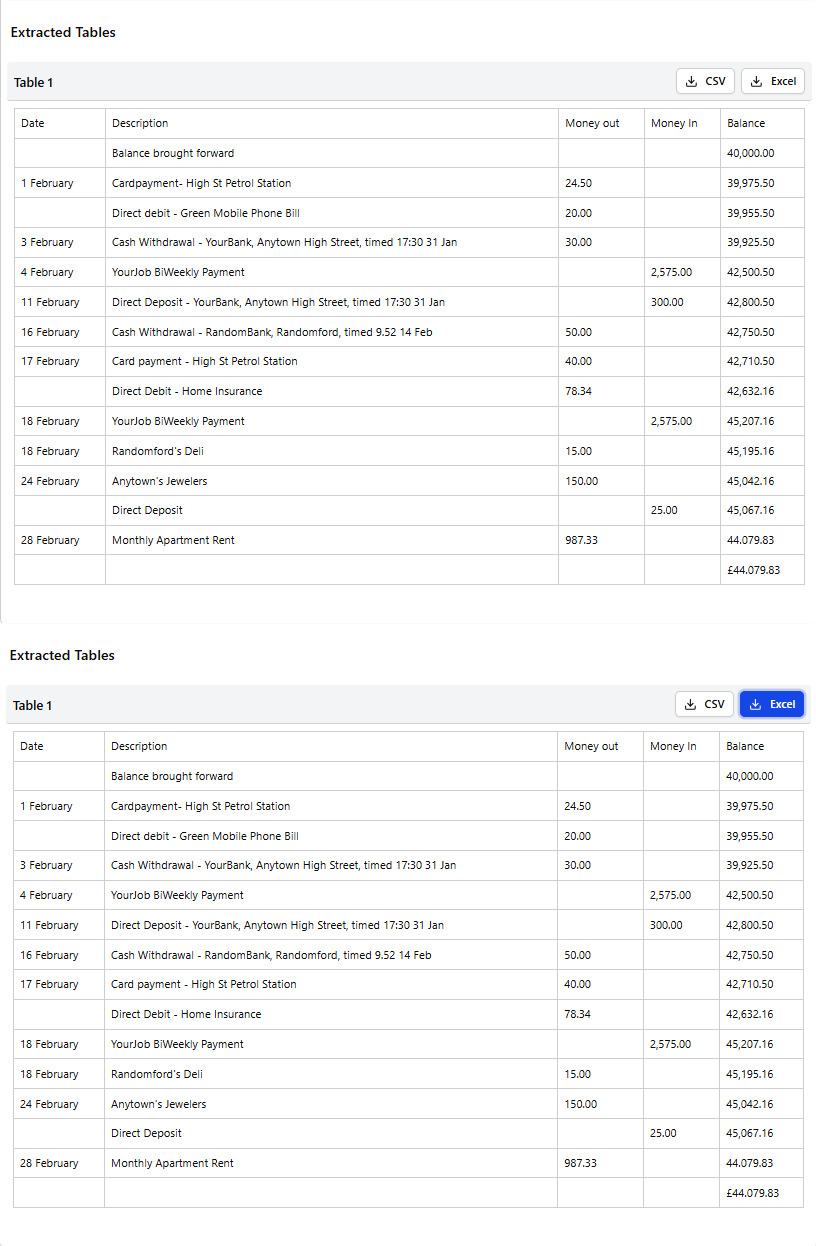
Clean data, ready to use — in seconds.
DocInterpreter extracts every cell and packages it into a polished Excel or CSV file. No reformatting, no manual cleanup — open the file and your data is structured exactly the way you mapped it.
- Excel & CSV export
- Precise cell mapping
- Download in one click
- Works with any bank or vendor
Tailored for your business needs
Whether it's daily expenses or monthly reconciliations, we've got you covered.
Convert your document in seconds
Pick your document type and start converting to Excel, CSV, or JSON — 5 free credits, no credit card required.
Bank Statement Converter
Convert statements from any bank into clean, reconcilable transaction data.
Open Bank Statement ConverterReceipt Converter
Pull merchants, totals, tax and line items out of any receipt photo or scan.
Open Receipt ConverterInvoice Converter
Extract vendors, totals, tax and line items from multi-page invoices.
Open Invoice ConverterPurchase Order Converter
Pull PO numbers, vendors, line items and totals out of any purchase order.
Open Purchase Order ConverterBill of Lading Converter
Extract shippers, consignees, containers and freight details from any BoL.
Open Bill of Lading ConverterUtility Bill Converter
Turn electricity, gas, water and telecom bills into usage and cost data.
Open Utility Bill ConverterTax Form Converter
Extract wages, withholdings and box amounts from W-2s, 1099s and more.
Open Tax Form ConverterPaystub Converter
Pull gross pay, deductions, taxes and YTD totals out of any pay stub.
Open Paystub ConverterUse DocInterpreter inside your AI assistant
Connect DocInterpreter to Claude, Cursor, or any other MCP client and pull structured data out of your documents without leaving the conversation.
Ask for the data you need
Point your assistant at an invoice and ask for the line items, the total, or the tax. The answer comes back as structured data, not a guess.
Give your agents document access
Let a coding or research agent read receipts, statements and forms so it can work with real numbers instead of ones you paste in by hand.
Keep one credit balance
Calls made over MCP draw from the same credits as the web app. Create a key in your settings and revoke it whenever you like.
{
  "mcpServers": {
    "docinterpreter": {
      "url": "https://docinterpreter.com/api/mcp",
      "headers": {
        "Authorization": "Bearer dik_live_…"
      }
    }
  }
}
Auto extraction only — OCR table mapping and custom schemas stay in the web app.
Why choose DocInterpreter?
Built for Accountants, Book Keepers, Data Entry Operators and any other Professionals who need accurate, fast, and reliable PDF and image data extraction.
One plan, one price
DocInterpreter for Windows. Pick how often you pay.
Works out at ₹333.00 a month.
- Unlimited documents and pages — nothing is metered
- Both engines: exact text from digital PDFs, on-device OCR for scans
- Your documents never leave your computer
- Export to Excel, CSV and JSON
- One machine per licence key
- All updates while your subscription is active
New here? Start a free 7-day trial from your settings — no card required.
Cancel any time. You keep access until the end of the period you have paid for.
Frequently asked questions
Everything you need to know about DocInterpreter.
What file formats does {app} support?+
{app} accepts PDF, JPG, JPEG and PNG files. Output is provided as Excel (XLSX), CSV or JSON.
Do I need a credit card to start?+
No. New users get 5 free credits without entering payment details.
How accurate is the extraction?+
{app} uses Azure Vision and a structured drawing workflow to achieve 99.9% accuracy on most invoice, receipt and bank statement layouts.
Is my data secure?+
Uploaded files are stored on encrypted AWS S3 storage and processed only for the duration required for extraction.